
How to Run a Full Funnel Audit With AI (Not Just Your Emails)
Most of us build our funnel once and then leave it alone. You write the welcome emails, set up the sales page, drop in the tracking pixel, connect the freebie, and turn the whole thing on. Then you move on to the next project, because there is always a next project.
The problem is that the funnel keeps running the entire time, and you have no real way of knowing whether it still works the way you set it up. That is true for the emails, and it is just as true for the pages, the tracking, and all the links that connect them.
I learned that yesterday when I sat down to audit my five Newsletter Profit Club funnels from top to bottom. I went through every page, every pixel, every redirect, and every automated email in them, and I found a handful of things that had been broken for who knows how long, even though I build these for a living.
A couple of links below are affiliate links, for the two tools I connected here, Kit and HTMLPub. If you sign up through one, I may get a small commission, and often you get a bonus on your end too. I only link tools I actually use.
What a real audit turned up
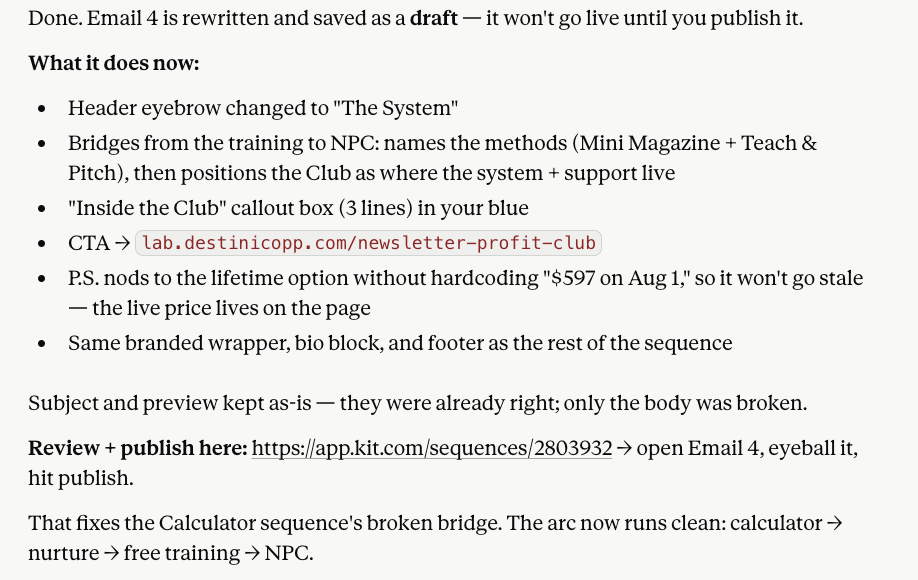
The first problems showed up in the emails. Two of my sequences had a duplicate email sitting inside them, the same body sent twice under two different subject lines. In one of those sequences, the duplicate had replaced the email that was supposed to make the offer, so the sequence spent days warming people up for a sale and then never actually made it.
There is no error message and no warning when this happens. The subscriber just does not buy, and you end up blaming the offer when the real problem is a broken sequence.
The emails were only part of the story, though. The bigger problems were hiding on the pages and in the wiring between my tools, which is exactly where most of us never think to look.
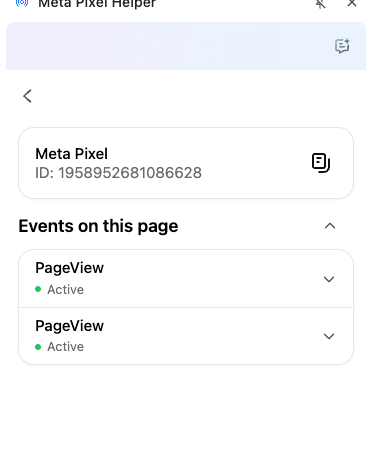
On one of my landing pages, the tracking pixel was firing twice, which doubles your numbers and leaves every ad decision resting on bad math. I also found dead links pointing to a shop I closed months ago, and an old brand name still showing up in some email signatures from before I renamed a program. None of it is dramatic on its own, but it adds up, and it sits there because nobody goes back and looks at the whole path at once.
That last number is the one I want to talk about. A funnel this size used to mean the better part of a miserable week, clicking through every page and every email by hand. This time it took an afternoon, and the difference was not that I worked faster. It was that I had AI working inside my actual tools, across all of them at the same time.
I let AI work across my tools, not just talk about them
Most of us only use AI to give advice. You paste in an email, it suggests a fix, and you make the change yourself, which is helpful but slow. It never touches the actual work, and it only ever sees the one thing you pasted, never the whole funnel.
This time was different, because I connected the AI directly to two tools at once so it could open both and work inside them. The thing that makes that possible is called an MCP.
MCP stands for Model Context Protocol. The name does not matter. Think of it as a key that lets your AI assistant open and work inside another tool you already use.
Turn the key on for more than one tool, and the AI can move between them in a single session. It is reading your real pages and your real emails, not a copy you pasted in, and it can edit both.
I had two of these connections on for this job. One for Kit, my email platform, so the AI could read and rewrite the actual sequence emails. One for HTMLPub, where my landing pages live, so it could open the page code, clean up the duplicate tracking pixel, and fix the dead links. My Leadpages-style pages work the same way.
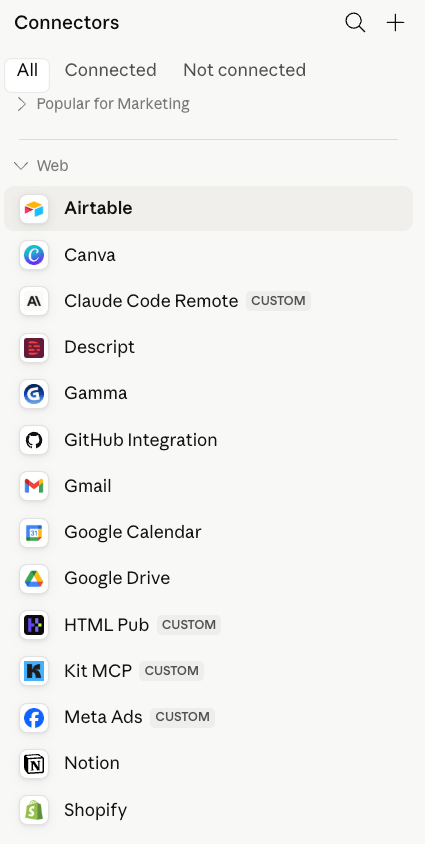
That is the part that matters more than any single email fix. The expensive problems in a funnel almost always hide in the handoffs between tools, like a page that loads its pixel wrong, a redirect that sends people to an old offer, or an email whose button points to a page you already moved. When the AI can see the page and the email in the same session, it catches those handoff problems, which are the ones that are easiest to miss when you are checking by hand.
The prompt that kicked it off
None of this works without clear instructions, so I did not just say "fix my funnel" and walk away. I gave it a specific job, an order to work in, and two firm rules. This is roughly the prompt I started with.
"I want to audit my five Newsletter Profit Club funnels. You have access to my Kit account and my HTMLPub pages. Start with the landing pages and their tracking pixels, then the links and redirects between pages, then go through every email sequence one at a time. For each piece, check for broken or dead links, tracking that is missing or firing more than once, duplicate or repeated content, the wrong brand name, calls to action that point to the wrong place, and anything that is hurting conversion, like a weak or missing call to action, an offer that is never actually pitched, or a confusing next step. Flag anything that looks off before you change it. Do not publish anything live until I tell you to. Let's go one piece at a time."
That prompt does a few specific things. It names both tools, and it sets the order to work in, starting with the pages and their tracking, then the links between them, and finally the emails. It also lists the exact things to look for so the AI is not guessing what "broken" means, and it sets two guardrails that kept me in control the entire time.
The four-step method I followed
You can run this same pass on your own funnel, and it is not technical at all. It is really just a conversation with a few clear steps.
Connect your tools
Turn on the MCP connection for your email platform and your page builder. This is in each tool's settings, and it is the only setup step. Once both are on, your AI can see and edit the real content in either one.
Walk it one layer at a time
Do not ask it to review everything at once. Start with the pages and their tracking, then the links and redirects, then one email sequence at a time. Small scope means careful work and fewer mistakes.
Make it flag before it fixes
Tell it to show you what is wrong before changing anything. You want to see the doubled pixel or the duplicate email and approve the fix. This is where you stay the decision maker, not a bystander.
Fix, then publish on your say-so
Once you approve, it makes the edit, in the page code or the email, whichever it is. Keep changes as drafts until you give the word to go live. That way a fix can wait for your eyes before anyone sees it.
Run this on your own funnel this week
Block off one afternoon and work straight down this list. The prompt above is the engine, and these are the steps around it.
- Turn on the AI connection for your email tool and your page builder, both in their own settings.
- Open a fresh chat with your AI and paste in the starter prompt above.
- Start with the pages. Have it check every opt-in and sales page for broken links, tracking pixels firing more than once, and offers that are missing or unclear.
- Check the wiring next. Look at the redirects between pages and confirm each form feeds the right sequence.
- Walk the emails one sequence at a time, watching for duplicates, dead links, old brand names, wrong prices, and weak or missing calls to action.
- Make it flag every problem and wait for your okay before it changes a single thing.
- Keep each fix as a draft until you have read it, then publish on your say-so.
Why we never do this on our own
Most funnels fall apart because we treat building them as the end. You set it up, you move on to the next thing, and you never go back to check it. The funnel keeps running the whole time, but nobody is actually watching it anymore.
A funnel is not really one thing, though. It is a chain of pieces spread across a few different tools, and every piece can drift on its own. A link breaks, a pixel doubles up, an offer ends while the page keeps selling it, or a brand gets renamed in one place and not the others. The machine keeps running with the old parts the whole time, and there is no alarm to tell you. The cost just shows up as sales that never happen, and you almost always blame the wrong piece.
"A broken funnel does not look broken. It runs like it always did, stops making sales, and sends you chasing the offer when the real problem is a pixel or a link."
— Dr. Destini CoppThis sits right in the Nurture stage of the Creator Growth Flywheel, the part of your business where you turn new leads into buyers. If that stage is leaking, everything upstream is wasted. You can run all the ads and summits you want, but if the page tracks wrong and the welcome sequence never makes the offer, the work leaks out the bottom.
One thing I want to be clear about
I want to be clear that I did not let AI run loose in my accounts, because speed is only worth having if you stay in control of it.
Two rules made that work. The first was to flag before changing, so I saw every problem before a single edit happened. The second was that nothing went live until I approved it. The AI did the tedious part, reading thousands of lines of page and email code and spotting the repeats, and I made every call about what actually shipped. The tool does the looking, and you do the deciding.
If you can block off a single afternoon, connect your email tool and your page builder and walk the whole funnel one layer at a time, asking to see the problems before you fix them. I would bet money you find at least one thing that has been costing you sales. I build these for a living, and I found several, on the pages and in the emails both.
Not sure where your funnel is leaking?
Take the free Creator Growth Flywheel scorecard. In a few minutes you will see which stage of your business is strong and which one is costing you sales.
Take the Free Scorecard →Frequently Asked Questions
A full funnel audit is a review of every piece a new lead touches, not just the emails. That means your opt-in and sales pages, the tracking pixels on them, the links and redirects, and the automated email sequences that follow. You are checking the whole path from first click to purchase for anything broken, outdated, or pointed at the wrong place.
Both, depending on how it is connected. By default, AI can only give advice. You paste something in and it tells you what to fix. But with a connection called an MCP, you can give the AI access to the actual tool. Once that is set up, it can open your email platform and your page builder, read the real content, and edit it directly, instead of just describing what you should change.
MCP stands for Model Context Protocol, but the name does not matter much. Think of it as a key that lets your AI assistant open and work inside another tool. When my email platform and my page builder both had an MCP connection turned on, Claude could read and edit the real content in both accounts in the same session, not a copy I pasted in. Many tools now offer these connections in their settings.
Start with the pages: broken or dead links, outdated offers, and tracking pixels that are missing or firing more than once. Then the connections: redirects that point to the wrong place and forms that send people into the wrong sequence. Then the emails: duplicate or repeated content, old brand names, wrong prices, and calls to action that link to the wrong page. The expensive bugs usually hide in the handoffs between tools.
No. The whole point is that you describe what you want in plain language and the AI does the technical part, even the page code and the tracking setup. What you do need is clear instructions and good guardrails, like telling it to flag problems before changing anything and to never publish live until you approve. That keeps you in control without being technical.