


Most Creators Redesign Their Website the Wrong Way
Here's how it usually goes. You decide the site needs a refresh, you open Canva or Squarespace, you start tweaking colors and swapping fonts, and two hours later you have something that looks slightly different but still doesn't convert.
The problem isn't the colors. It's that most homepage redesigns start with aesthetics when they should start with strategy.
I went through this exact process with HobbyScool — my creative education platform — and I want to walk you through what I actually did. Because the tool I used (Claude Design) gave me something I didn't expect: a thinking partner that forced me to get clear on what the homepage was supposed to do before we ever talked about what it should look like.
Here's the full before, process, and after.
The Before: What Wasn't Working
The old HobbyScool homepage was functional. It wasn't broken. But it had the classic problem of a site that grew by addition — sections got added over time without a clear conversion hierarchy driving the decisions.
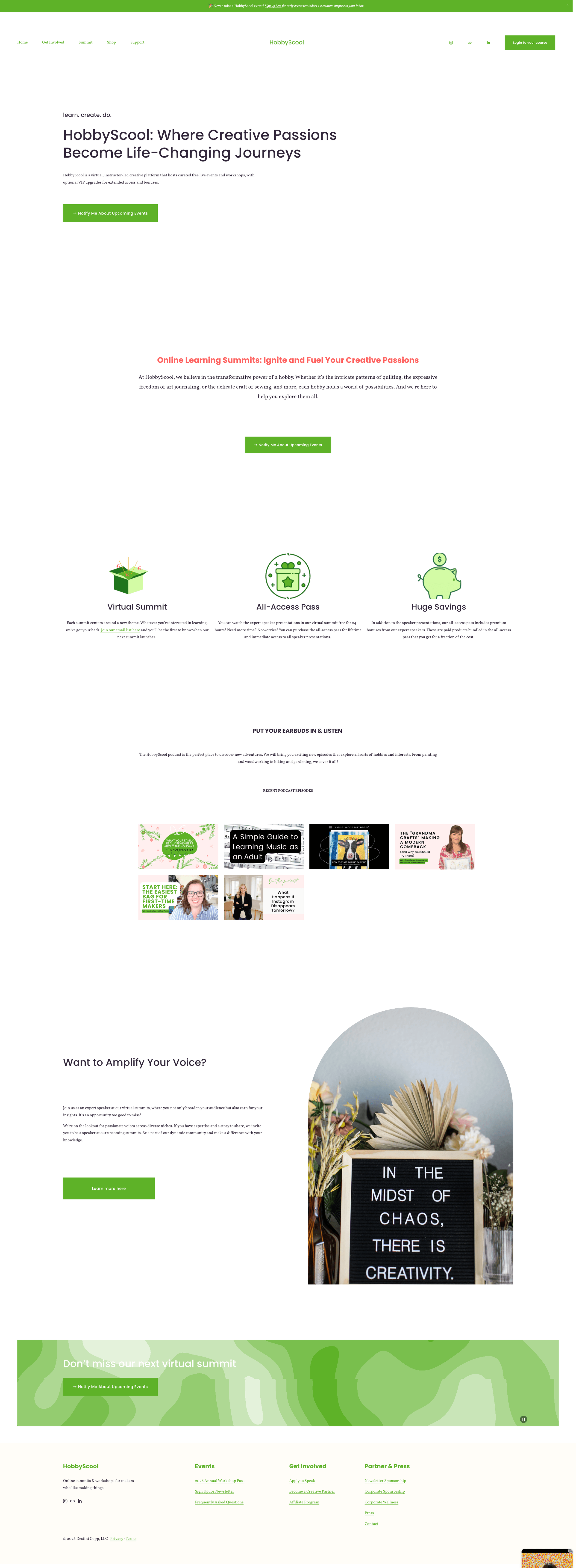
Looking at it honestly, here's what the page was doing:
- Hero headline present, but no email capture in sight above the fold
- Big empty space below the hero — all that white space was wasted conversion real estate
- Sections (podcast, speaker recruitment, feature icons) competing for attention with no hierarchy
- No clear single goal — the page was trying to do too many jobs at once
- Visitors could read the whole page and still not know what to do next
- Clear single goal: get on the email list for upcoming events
- Email capture as the primary CTA, front and center
- Event-forward structure — the site leads with what HobbyScool actually does
- Full 2026 summit calendar visible, so visitors can see the scope
- Secondary CTAs (speaker program, podcast) still present but properly subordinated
The biggest shift wasn't visual. It was strategic. We went from "show everything" to "do one thing well."
Step 1: Strategy Before Aesthetics
The first question I worked through — before touching any design tools — was deceptively simple: what is the one thing a homepage visitor should do?
For HobbyScool, the answer was clear once I said it out loud: get on our email list so they're notified about our next event. That's it. Not buy a product. Not join the membership. Not browse the podcast. Join the list.
"Everything else is just supporting that conversion. The homepage has one job."
— The reframe that changed the whole redesignOnce you know the one job, the section decisions become obvious. You ask about each section: does this support the conversion, or distract from it? If it distracts, it doesn't belong on the homepage. It can live in the nav.
This sounds simple. But most creators have never explicitly made this decision. Their homepage is an accretion of things that seemed important at the time.
Before you open any design tool, answer this: what is the single most valuable action a first-time visitor to your homepage can take? Not the most impressive thing you can show them — the most valuable action they can take. That answer drives every layout decision that follows.
Step 2: How I Used Claude Design
Claude Design lives at claude.ai/design. It's different from the regular Claude chat interface — it's built specifically for generating visual layouts and wireframes. You describe your goal, upload reference screenshots for visual inspiration, and it generates multiple homepage concepts you can iterate on in real time.
Here's how the process actually worked:
Brief the tool on your goal, not your aesthetic
I didn't open with "I want a green and pink website." I opened with "The homepage has one goal: get creative hobbyists on our email list so they're notified about upcoming free events." Claude Design built everything around that.
Upload 2–3 reference screenshots
I pulled screenshots from sites that each did one thing well — Domestika for creative education aesthetic, Creativebug for how they display event/workshop cards, and a conference registration page for email-capture energy. Two to three references is the sweet spot. More than that and the design starts pulling in too many directions.
Let it generate options — then react honestly
Claude Design generated multiple wireframe concepts in the first round. Some I liked, some I didn't. The key is to be specific about what's working: "I love the hero from Variant H but I want the full calendar grid from Variant I lower on the page." The more specific your feedback, the faster you converge on something great.
Iterate in real time
We went through multiple rounds — adjusting headlines, swapping layout structures, resolving the auto-update question (more on that below). The whole wireframe phase happened in one session. What used to take days of back-and-forth with a designer happened in an afternoon.
The Wireframe Iteration Process
This is the part most tutorials skip, but it's where the real value is. Claude Design doesn't just spit out one answer — it gives you multiple strategic directions to choose from.
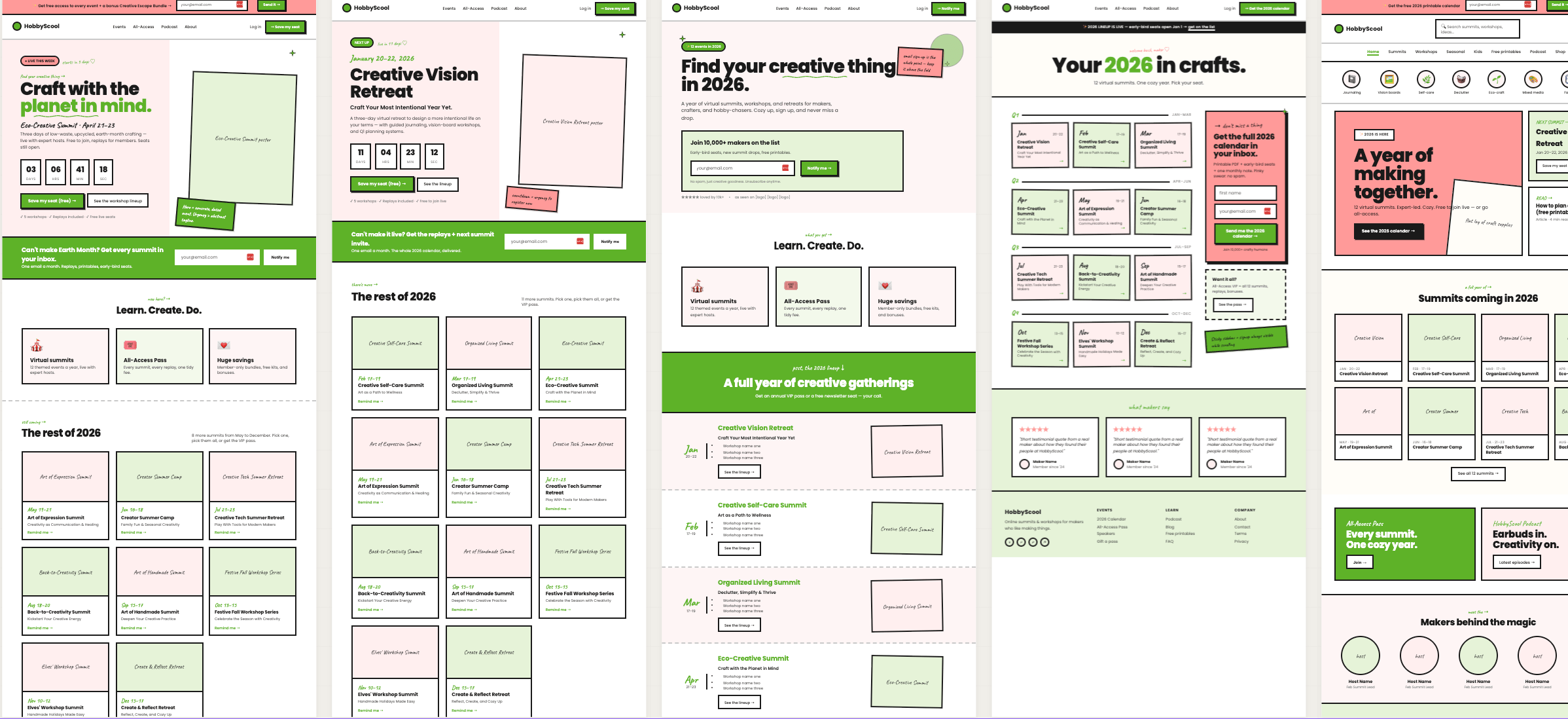
In my session, we worked through concepts including:
Event-forward hero — one summit, full focus
Leads with the next upcoming event as the hero, with a countdown timer and a "Save my seat" CTA. High urgency but limited to one event at a time — good if you're always in an active launch window.
List-first — the email capture leads everything
The hero is built around the list signup with the Creative Escape Bundle as the lead incentive. Events become the supporting reason to subscribe rather than the primary CTA. Strong if list growth is the priority over any single event.
Magazine grid — all 12 summits visible at once
Shows the full 2026 calendar as a grid of event tiles. One tile per month, with the next event highlighted. Communicates scale and frequency — visitors immediately understand HobbyScool isn't a one-off event, it's a year-round platform.
Story scroll — emotional, single-column
Essay-style layout that tells the HobbyScool origin story and leads to a signup moment at the emotional climax. Lower volume but higher-quality leads. Very on-brand for a warm, community-driven platform.
The option I landed on was a hybrid: the event-forward hero from Concept A with the full calendar grid from Concept C built in below the fold. Email capture is the consistent CTA at multiple points on the page.
You don't have to pick one wireframe concept wholesale. In my final design, I took the hero structure from one variant and the calendar layout from another. Claude Design makes it easy to mix and match once you know what each element is doing strategically.
The Auto-Update Question (And the Squarespace Reality)
One thing we worked through in the design session: I wanted the homepage to automatically highlight the next upcoming event without me having to manually update it every month. Clean idea in theory.
The practical reality with Squarespace: native blocks can't read a date and auto-switch content. You'd need a Code Block with JavaScript logic to do it. That's possible, but it adds complexity — and complexity on your homepage is a liability.
The decision I made: go with the cleanest hand-edit workflow instead. A few "swap zones" in the hero that I update in about two minutes when a new summit launches. Simple always wins in implementation.
This is something a design tool surfaces that a standard website template never would — the real tradeoff between what looks good in theory and what you'll actually maintain.
The After: What the New Homepage Does
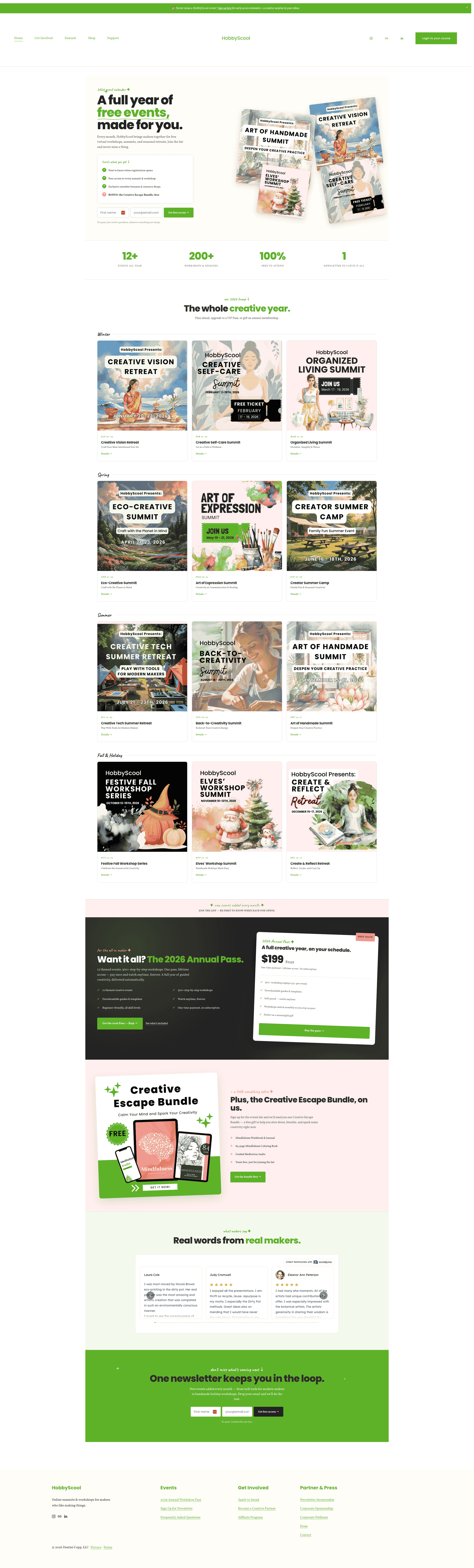
Here's what the redesigned homepage does differently:
The headline does real work now — "learn. create. do." as a tagline communicates the brand promise without the visitor having to read a paragraph to understand it. The email CTA is above the fold. The calendar shows scale. Secondary sections (podcast, speaker program) are present but properly positioned as supporting content, not competing destinations.
And critically — every section answers the question: does this make someone more or less likely to sign up for the list? If the answer was "less likely," that section either moved or got cut.
What This Means for Your Homepage
You don't need a designer to do this kind of thinking. You need a clear goal and a tool that helps you think through the structure before you touch the build.
Here's what I'd take from this process and apply to your own site:
Strategy first, aesthetics second
The most important thing you'll decide in a homepage redesign isn't the color palette. It's the single conversion goal. Make that decision explicitly, in writing, before you open any design tool.
Use reference screenshots strategically
Don't screenshot things that look pretty. Screenshot things that do the specific job you need done. One reference for vibe, one for structure, one for your offer type. That's enough.
Iterate fast, decide deliberately
Claude Design generates multiple concepts quickly. Don't fall in love with the first one. Give real feedback ("I love this but I want X from the other option") and keep iterating until the structure feels right before you move to hi-fi.
Design for what you'll actually maintain
The most beautiful homepage is useless if you won't keep it updated. Ask yourself: "Will I actually update this section every month?" If the answer is no, simplify the design before you build it.
The Creator Growth Flywheel starts with Attract — and your homepage is the most important Attract asset you have. A homepage that's converting visitors into email subscribers is doing its job. One that isn't — no matter how beautiful — is a missed opportunity every single day.
Claude Design is available at claude.ai/design. If you've been putting off a homepage refresh because you didn't know where to start — this is where to start.
How Healthy Is Your Creator Business?
Take the free Creator Business Scorecard to see where your Attract, Engage, and Convert systems are strong — and where they're leaking growth.
Take the Free Scorecard →Frequently Asked Questions
Claude Design is an AI-powered design tool from Anthropic available at claude.ai/design. You describe your site's goal, upload reference screenshots for visual inspiration, and Claude generates multiple wireframe concepts you can iterate on. It's particularly useful for mapping out layout and conversion hierarchy before you build anything in your actual website platform.
Yes. Claude Design generates wireframes and layout concepts that you then implement manually in Squarespace. It doesn't connect directly to Squarespace, but it gives you a clear blueprint — including a section-by-section map — so the build is straightforward. For any dynamic elements like auto-updating event countdowns, you'd use a Squarespace Code Block.
Pick 2–3 screenshots that each do one thing well: one for overall vibe, one for homepage structure, and one for how they display their offer or product. Too many references pull the design in too many directions. Sites like Domestika, Creativebug, and Lovecrafts work well for creative and educational brands.
Claude Design typically generates multiple distinct concepts in a single session — in my redesign session for HobbyScool, we worked through 10 different variants across two rounds of iteration. Each one had a different strategic priority: some were event-forward, some led with the email list bonus, some showed a full calendar view. You can keep iterating until you find the direction that fits.
No. The most important skill is being clear about your homepage's conversion goal — not aesthetics. If you know who your visitor is and what one action you want them to take, Claude Design can do the layout thinking for you. The clearer your brief, the better the output.